
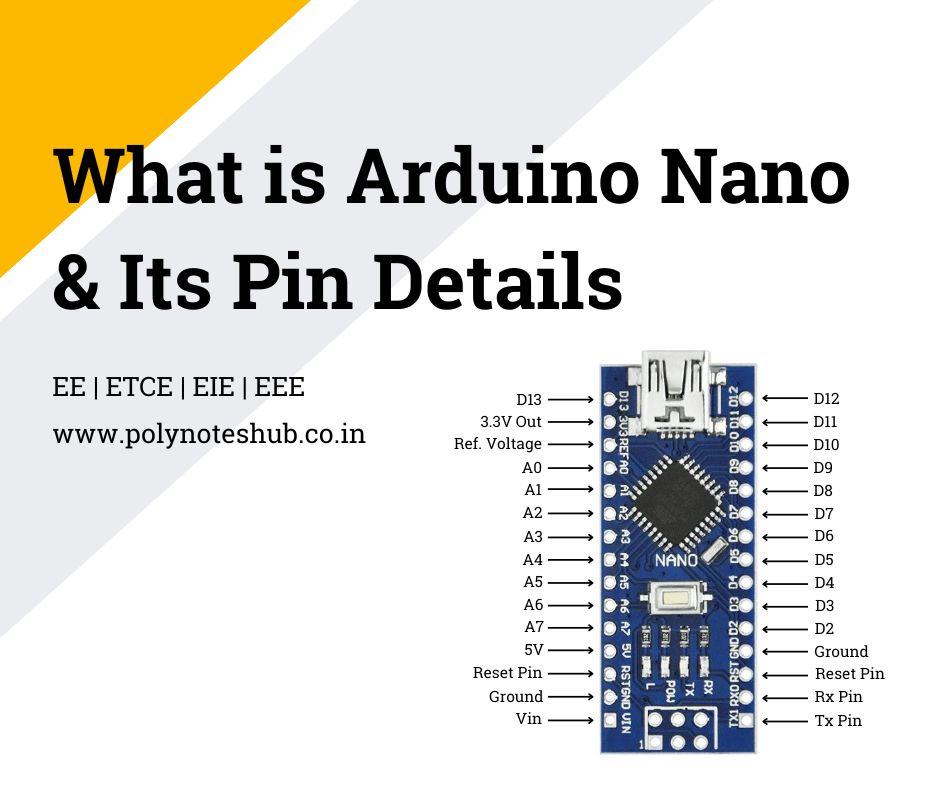
In this blog, we are going to learn about a topic called “What is Arduino Nano?“, also about its specifications, pinout, applications, and many more information about Arduino Nano. Welcome to Poly Notes Hub, a leading destination for engineering notes.
Author Name: Arun Paul.
What is Arduino Nano?
Arduino Nano is a small and multipurpose microcontroller board based on the ATmega328P microcontroller processor. It’s essentially a smaller version of the popular Arduino Uno board, with identical features but a smaller form size. The Nano is intended for easy integration into a variety of projects with limited space, making it ideal for prototyping, DIY electronics, and educational applications.

Key Features of Arduino Nano –
- Small-scale layout
- Use the digital and analog input/output pins of the ATmega328P microcontroller
- PWM functionalities
- Many interfaces for serial connection
- USB interface for power and programming
- Suitable for use with the Arduino IDE
- Adaptable to a range of uses
Specifications of Arduino Nano
Below we listed some Arduino Nano Specifications –
- Microcontroller: ATmega328P
- Operating Voltage: 5V
- Input Voltage (recommended): 7-12V
- Digital I/O Pins: 14 (of which 6 provide PWM output)
- Analog Input Pins: 8
- DC Current per I/O Pin: 40 mA
- Flash Memory: 32 KB (ATmega328P) of which 2 KB used by bootloader
- SRAM: 2 KB (ATmega328P)
- EEPROM: 1 KB (ATmega328P)
- Clock Speed: 16 MHz
- USB Interface: Micro-USB
- Dimensions: 18.5mm x 45mm
Arduino Nano Pinout
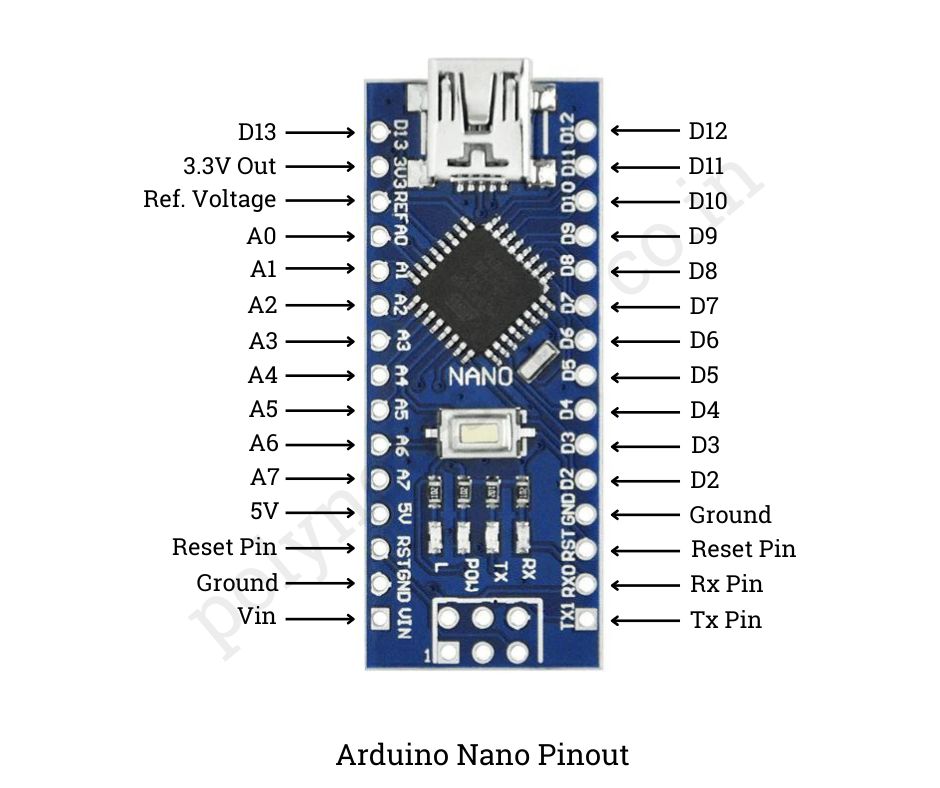
Below we listed Arduino Nano Pin Configuration –
- Digital Pins (D0-D13): Used for digital input and output. They can be used as input or output devices and can read or write digital signals (0 or 1).
- Analog Pins (A0-A7): Used for analog input. They can obtain analog voltage levels from sensors and other analog devices.
- Power Pins: There are four types of power pins in Arduino Nano which are listed below
- 5V: Provides a regulated 5V power output for external components.
- 3.3V: Provides a regulated 3.3V power output for low-power components.
- Vin: Input voltage (7-12V) when using an external power source.
- GND: Ground pins for connecting the ground of external components.
- PWM Pins (D3, D5, D6, D9, D10, D11): These are the PWM pins. They can generate analog-like signals with variable duty cycles, which can be used to adjust LED brightness, motor speed, and other parameters.
- External Interrupt Pins (D2, D3): Pins capable of creating interruptions in response to external events. They can be programmed to do certain activities in response to external signals.
- SPI Pins (D10-D13): Serial Peripheral Interface (SPI) pins are utilized for communication. A synchronous serial communication protocol called SPI is frequently used to facilitate communication between peripheral devices and microcontrollers.
- I2C Pins (A4 (SDA), A5 (SCL)): The Inter-Integrated Circuit (I2C) communication pins. With just two wires needed for communication, numerous devices can connect to one another thanks to the I2C serial communication standard.
- Serial Pins (RX, TX): Pins are used for serial transmission. These pins are used to communicate with a computer or other serial devices via the Universal Asynchronous Receiver/Transmitter (UART) protocol.
- Reset Pin (RESET): Resets the microcontroller. When pulled low, the application is restarted from the beginning.
Arduino Nano Uses
The Arduino Nano’s compact form and various capabilities make it suitable for use in a variety of sectors –
- It is widely used in electronics prototyping to enable rapid development and testing of ideas.
- DIY enthusiasts use it to develop their own devices, automation systems, and interactive projects.
- Because of its simplicity, it is a fantastic educational tool for teaching electronics, programming, and robotics.
- It also plays an important part in IoT development, robotics, automation, data recording, wearable technologies, art installations, and embedded systems.
- Its wide range of applications demonstrate its versatility and utility in a variety of projects and sectors.