
In this note, we are going to know about TCON Register in 8051 Microcontroller. Welcome to Poly Notes Hub, a leading destination for engineering notes for diploma and degree engineering students.
Author Name: Arun Paul.
TCON Register in 8051 Microcontroller
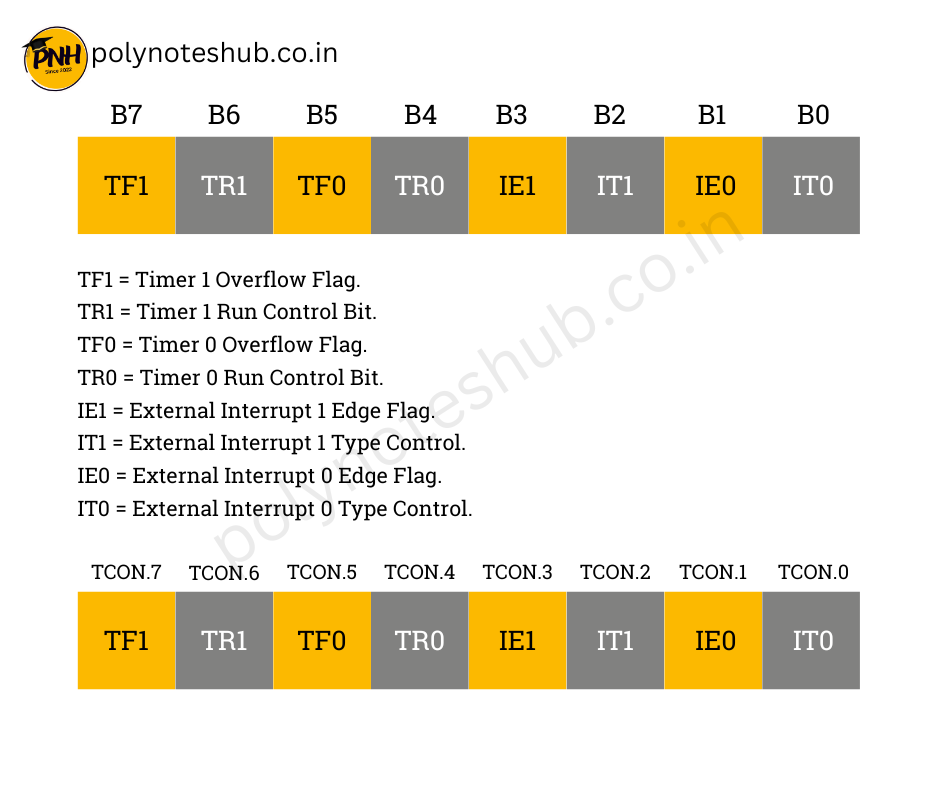
The TCON register in 8051 microcontroller is an 8-bit special function register (SFR) that governs the operation of timers and some interrupt-related functions. The TCON register in 8051 Microcontroller is at location 88H in the SFR memory space.
Structure of the TCON Register
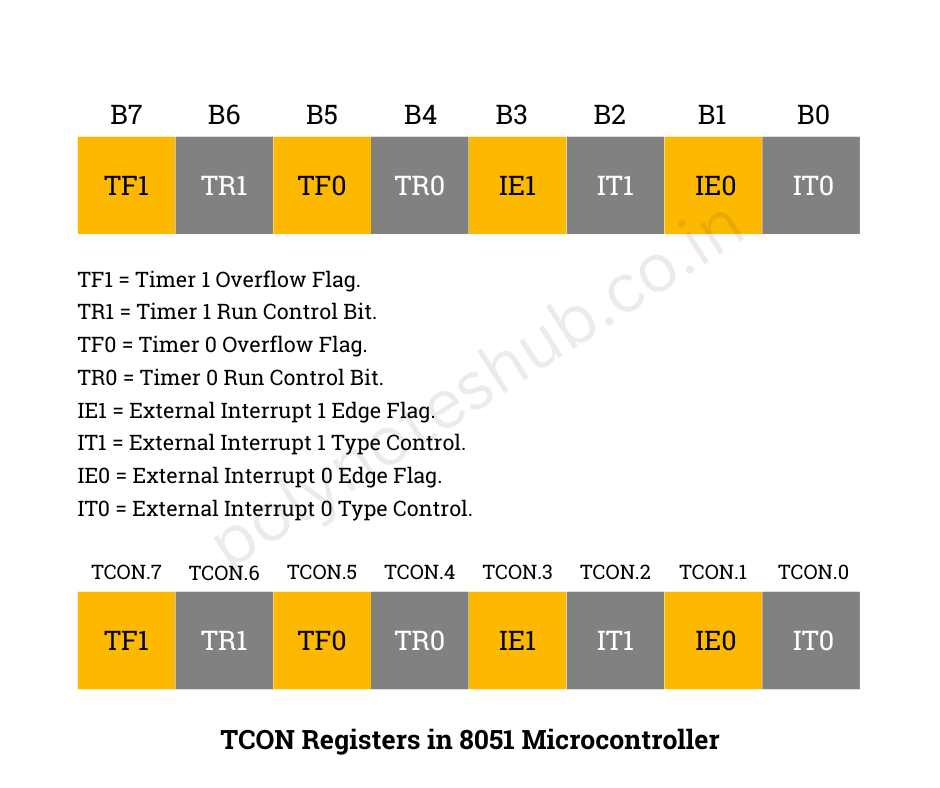
The TCON register is divided into two main groups –
- Timer Control Bits (TF1, TR1, TF0, TR0)
- Interrupt Control Bits (IE1, IT1, IE0, IT0)
Bit Layout of TCON Register –
| Bit | Symbol | Description |
|---|---|---|
| TCON.7 | TF1 | Timer 1 Overflow Flag. Set by hardware when Timer 1 overflows; must be cleared by software. |
| TCON.6 | TR1 | Timer 1 Run Control Bit. Set to 1 to start Timer 1. |
| TCON.5 | TF0 | Timer 0 Overflow Flag. Set by hardware when Timer 0 overflows; must be cleared by software. |
| TCON.4 | TR0 | Timer 0 Run Control Bit. Set to 1 to start Timer 0. |
| TCON.3 | IE1 | External Interrupt 1 Edge Flag. Set by hardware when an edge is detected. |
| TCON.2 | IT1 | External Interrupt 1 Type Control. Set to 1 for edge-triggered; 0 for level-triggered. |
| TCON.1 | IE0 | External Interrupt 0 Edge Flag. Set by hardware when an edge is detected. |
| TCON.0 | IT0 | External Interrupt 0 Type Control. Set to 1 for edge-triggered; 0 for level-triggered. |
Bit Descriptions:
A. Timer Bits –
- TF1 (TCON.7): Indicates Timer 1 has overflowed. It is cleared by software after handling the overflow condition.
- TR1 (TCON.6): Starts or stops Timer 1. Set this bit to 1 to enable Timer 1.
- TF0 (TCON.5): Indicates Timer 0 has overflowed. It is cleared by software after handling the overflow condition.
- TR0 (TCON.4): Starts or stops Timer 0. Set this bit to 1 to enable Timer 0.
B. Interrupt Bits –
- IE1 (TCON.3): When an external interrupt (INT1) occurs, the hardware sets this value. If the interrupt is level-triggered, it is cleared automatically; if it is edge-triggered, software clears it.
- IT1 (TCON.2): Configures the trigger type for External Interrupt 1 (INT1). 1 = Edge-triggered, 0 = Level-triggered.
- IE0 (TCON.1): Hardware sets this value when an external interrupt (INT0) occurs. If the interrupt is level-triggered, it is cleared automatically; if it is edge-triggered, software clears it.
- IT0 (TCON.0): Configures the trigger type for External Interrupt 0 (INT0). 1 = Edge-triggered, 0 = Level-triggered.