Arduino Esplora Microcontroller Board - Pinout | New Topic - Poly Notes Hub
Poly Notes Hub
We use cookies to ensure that we give you the best experience on our website. If you continue to use this site we will assume that you are happy with it. Ok Privacy policy
In this note, we will learn about Arduino Esplora Microcontroller Board and Its Pinout . Welcome to Poly Notes Hub , a leading destination for engineering notes for diploma and degree engineering students.
Author Name: Arun Paul .
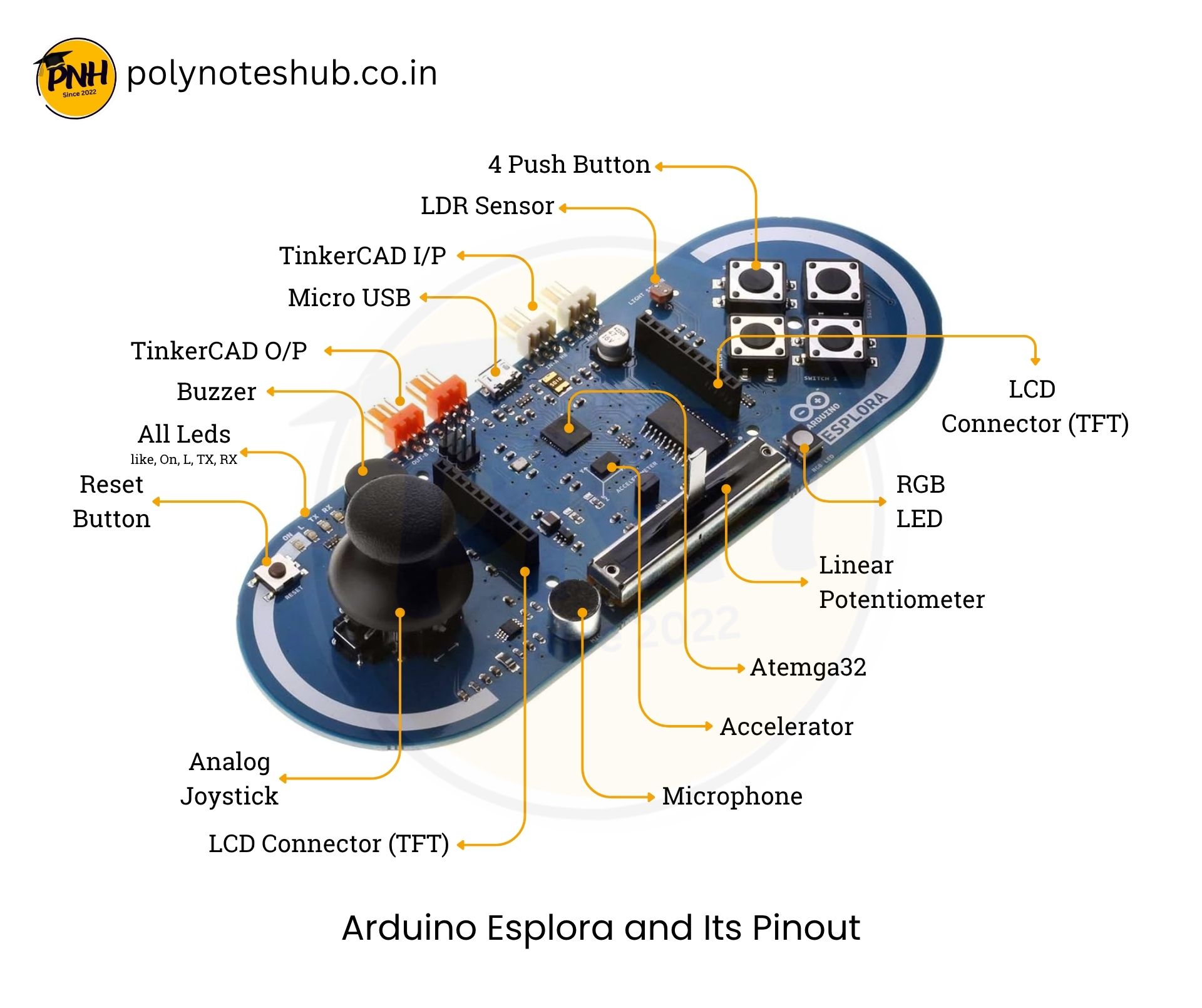
The Arduino Esplora is a one-of-a-kind microcontroller board built on the ATmega32U4 (the same processor as in the Arduino Leonardo). It was created as an all-in-one experimental and gaming controller, with built-in sensors, actuators, and connectors, eliminating the need to connect extra components for many applications.
Key Features of Arduino Esplora Development Board –
Specification Details Microcontroller ATmega32U4 Operating Voltage 5V Clock Speed 16 MHz Flash Memory 32 KB (4 KB used by bootloader) SRAM 2.5 KB EEPROM 1 KB USB Interface Micro-USB Power Supply USB or External (via JST connector) Communication UART, I2C, SPI Built-in Sensors Accelerometer, Joystick, Temperature, Light Sensor, Microphone Built-in Outputs RGB LED, Buzzer Expansion TinkerKit input/output connectors
Function of Each Pin of Arduino Esplora
Component Function Joystick (X, Y, Button) Analog movement in 2 directions + push button Temperature Sensor Measures ambient temperature (NTC thermistor) Light Sensor Detects ambient light intensity Microphone Captures sound level input Accelerometer Measures tilt and motion (3-axis) RGB LED Multi-color LED output (Red, Green, Blue)Buzzer Produces sound or tone output TinkerKit Connectors Easy connection for external sensors and actuators SPI, I2C, UART Interfaces Used for communication with other devices/modules Micro USB Port For programming and power Power Jack (JST) External power input option
Arduino Esplora Development Board Pin Function
Pin Type Count Function Digital I/O Pins 14 General purpose input/output PWM Pins 7 For analog-like output (pins 3, 5, 6, 7, 8, 9, 10) Analog Input Pins 6 For sensor readings (A0–A5) Communication Pins 5 UART, SPI, I2C Power Pins 3 VIN, 5V, GND
Programming and Libraries
You can program the Arduino Esplora using the Arduino IDE , just like any other board. To make things easier, Arduino has a dedicated library:
#include <Esplora.h>

void setup() {
  Serial.begin(9600);
}

void loop() {
  int xAxis = Esplora.readJoystickX();
  int yAxis = Esplora.readJoystickY();
  int light = Esplora.readLightSensor();
  int temp = Esplora.readTemperature(DEGREES_C);
  Serial.print("X: "); Serial.print(xAxis);
  Serial.print(" Y: "); Serial.print(yAxis);
  Serial.print(" Light: "); Serial.print(light);
  Serial.print(" Temp: "); Serial.println(temp);
  delay(500);
}
This code reads data from the joystick, light sensor, and temperature sensor, showing how easily the Esplora integrates multiple inputs.
Here’s a selection of fascinating and useful projects you may create with the Arduino Esplora, taking advantage of its sensors, joystick, and outputs.
Esplora Game Controller
Digital Thermometer
Sound Level Meter
Light Follower
Tilt-Controlled Mouse
Esplora Color Mixer
Reaction Timer Game
Mini Music Player
Motion Detector Alarm
Esplora Weather Monitor
Joystick-Controlled RGB Lamp
Esplora Data Logger
Gesture-Controlled Presentation Remote
Color-Based Alarm System
Sound Reactive LED Display
Post navigation
Arduino Esplora Microcontroller Board - Pinout | New Topic - Poly Notes Hub
We use cookies to ensure that we give you the best experience on our website. If you continue to use this site we will assume that you are happy with it. Ok Privacy policy
Arduino Esplora Microcontroller Board - Pinout | New Topic - Poly Notes Hub
Save as
Share on
All Clear
We use cookies to ensure that we give you the best experience on our website. If you continue to use this site we will assume that you are happy with it. Ok Privacy policy
Arduino Esplora Microcontroller Board - Pinout | New Topic - Poly Notes Hub
1st Year 1st SEM Notes ✭ 1st Year 2nd SEM Notes ✭ EE 2nd & 3rd Year Notes ✭ EEE 2nd & 3rd Year Notes ✭ ETCE 2nd & 3rd Year Notes ✭ EIE 2nd & 3rd Year Notes ✭ 1st Year 1st SEM Notes ✭ 1st Year 2nd SEM Notes ✭ EE 2nd & 3rd Year Notes ✭ EEE 2nd & 3rd Year Notes ✭ ETCE 2nd & 3rd Year Notes ✭ EIE 2nd & 3rd Year Notes ✭ 1st Year 1st SEM Notes ✭ 1st Year 2nd SEM Notes ✭ EE 2nd & 3rd Year Notes ✭ EEE 2nd & 3rd Year Notes ✭ ETCE 2nd & 3rd Year Notes ✭ EIE 2nd & 3rd Year Notes ✭ 1st Year 1st SEM Notes ✭ 1st Year 2nd SEM Notes ✭ EE 2nd & 3rd Year Notes ✭ EEE 2nd & 3rd Year Notes ✭ ETCE 2nd & 3rd Year Notes ✭ EIE 2nd & 3rd Year Notes ✭ 1st Year 1st SEM Notes ✭ 1st Year 2nd SEM Notes ✭ EE 2nd & 3rd Year Notes ✭ EEE 2nd & 3rd Year Notes ✭ ETCE 2nd & 3rd Year Notes ✭ EIE 2nd & 3rd Year Notes ✭ 1st Year 1st SEM Notes ✭ 1st Year 2nd SEM Notes ✭ EE 2nd & 3rd Year Notes ✭ EEE 2nd & 3rd Year Notes ✭ ETCE 2nd & 3rd Year Notes ✭ EIE 2nd & 3rd Year Notes ✭ 1st Year 1st SEM Notes ✭ 1st Year 2nd SEM Notes ✭ EE 2nd & 3rd Year Notes ✭ EEE 2nd & 3rd Year Notes ✭ ETCE 2nd & 3rd Year Notes ✭ EIE 2nd & 3rd Year Notes ✭ 1st Year 1st SEM Notes ✭ 1st Year 2nd SEM Notes ✭ EE 2nd & 3rd Year Notes ✭ EEE 2nd & 3rd Year Notes ✭ ETCE 2nd & 3rd Year Notes ✭ EIE 2nd & 3rd Year Notes ✭ 1st Year 1st SEM Notes ✭ 1st Year 2nd SEM Notes ✭ EE 2nd & 3rd Year Notes ✭ EEE 2nd & 3rd Year Notes ✭ ETCE 2nd & 3rd Year Notes ✭ EIE 2nd & 3rd Year Notes ✭ 1st Year 1st SEM Notes ✭ 1st Year 2nd SEM Notes ✭ EE 2nd & 3rd Year Notes ✭ EEE 2nd & 3rd Year Notes ✭ ETCE 2nd & 3rd Year Notes ✭ EIE 2nd & 3rd Year Notes ✭ 1st Year 1st SEM Notes ✭ 1st Year 2nd SEM Notes ✭ EE 2nd & 3rd Year Notes ✭ EEE 2nd & 3rd Year Notes ✭ ETCE 2nd & 3rd Year Notes ✭ EIE 2nd & 3rd Year Notes ✭ 1st Year 1st SEM Notes ✭ 1st Year 2nd SEM Notes ✭ EE 2nd & 3rd Year Notes ✭ EEE 2nd & 3rd Year Notes ✭ ETCE 2nd & 3rd Year Notes ✭ EIE 2nd & 3rd Year Notes ✭ 1st Year 1st SEM Notes ✭ 1st Year 2nd SEM Notes ✭ EE 2nd & 3rd Year Notes ✭ EEE 2nd & 3rd Year Notes ✭ ETCE 2nd & 3rd Year Notes ✭ EIE 2nd & 3rd Year Notes ✭ 1st Year 1st SEM Notes ✭ 1st Year 2nd SEM Notes ✭ EE 2nd & 3rd Year Notes ✭ EEE 2nd & 3rd Year Notes ✭ ETCE 2nd & 3rd Year Notes ✭ EIE 2nd & 3rd Year Notes ✭ 1st Year 1st SEM Notes ✭ 1st Year 2nd SEM Notes ✭ EE 2nd & 3rd Year Notes ✭ EEE 2nd & 3rd Year Notes ✭ ETCE 2nd & 3rd Year Notes ✭ EIE 2nd & 3rd Year Notes ✭ 1st Year 1st SEM Notes ✭ 1st Year 2nd SEM Notes ✭ EE 2nd & 3rd Year Notes ✭ EEE 2nd & 3rd Year Notes ✭ ETCE 2nd & 3rd Year Notes ✭ EIE 2nd & 3rd Year Notes ✭ 1st Year 1st SEM Notes ✭ 1st Year 2nd SEM Notes ✭ EE 2nd & 3rd Year Notes ✭ EEE 2nd & 3rd Year Notes ✭ ETCE 2nd & 3rd Year Notes ✭ EIE 2nd & 3rd Year Notes ✭ 1st Year 1st SEM Notes ✭ 1st Year 2nd SEM Notes ✭ EE 2nd & 3rd Year Notes ✭ EEE 2nd & 3rd Year Notes ✭ ETCE 2nd & 3rd Year Notes ✭ EIE 2nd & 3rd Year Notes ✭ 1st Year 1st SEM Notes ✭ 1st Year 2nd SEM Notes ✭ EE 2nd & 3rd Year Notes ✭ EEE 2nd & 3rd Year Notes ✭ ETCE 2nd & 3rd Year Notes ✭ EIE 2nd & 3rd Year Notes ✭ 1st Year 1st SEM Notes ✭ 1st Year 2nd SEM Notes ✭ EE 2nd & 3rd Year Notes ✭ EEE 2nd & 3rd Year Notes ✭ ETCE 2nd & 3rd Year Notes ✭ EIE 2nd & 3rd Year Notes ✭ 1st Year 1st SEM Notes ✭ 1st Year 2nd SEM Notes ✭ EE 2nd & 3rd Year Notes ✭ EEE 2nd & 3rd Year Notes ✭ ETCE 2nd & 3rd Year Notes ✭ EIE 2nd & 3rd Year Notes ✭ 1st Year 1st SEM Notes ✭ 1st Year 2nd SEM Notes ✭ EE 2nd & 3rd Year Notes ✭ EEE 2nd & 3rd Year Notes ✭ ETCE 2nd & 3rd Year Notes ✭ EIE 2nd & 3rd Year Notes ✭ 1st Year 1st SEM Notes ✭ 1st Year 2nd SEM Notes ✭ EE 2nd & 3rd Year Notes ✭ EEE 2nd & 3rd Year Notes ✭ ETCE 2nd & 3rd Year Notes ✭ EIE 2nd & 3rd Year Notes ✭ 1st Year 1st SEM Notes ✭ 1st Year 2nd SEM Notes ✭ EE 2nd & 3rd Year Notes ✭ EEE 2nd & 3rd Year Notes ✭ ETCE 2nd & 3rd Year Notes ✭ EIE 2nd & 3rd Year Notes ✭ 1st Year 1st SEM Notes ✭ 1st Year 2nd SEM Notes ✭ EE 2nd & 3rd Year Notes ✭ EEE 2nd & 3rd Year Notes ✭ ETCE 2nd & 3rd Year Notes ✭ EIE 2nd & 3rd Year Notes ✭ 1st Year 1st SEM Notes ✭ 1st Year 2nd SEM Notes ✭ EE 2nd & 3rd Year Notes ✭ EEE 2nd & 3rd Year Notes ✭ ETCE 2nd & 3rd Year Notes ✭ EIE 2nd & 3rd Year Notes ✭ 1st Year 1st SEM Notes ✭ 1st Year 2nd SEM Notes ✭ EE 2nd & 3rd Year Notes ✭ EEE 2nd & 3rd Year Notes ✭ ETCE 2nd & 3rd Year Notes ✭ EIE 2nd & 3rd Year Notes ✭ 1st Year 1st SEM Notes ✭ 1st Year 2nd SEM Notes ✭ EE 2nd & 3rd Year Notes ✭ EEE 2nd & 3rd Year Notes ✭ ETCE 2nd & 3rd Year Notes ✭ EIE 2nd & 3rd Year Notes
We use cookies to ensure that we give you the best experience on our website. If you continue to use this site we will assume that you are happy with it. Ok Privacy policy